Joy
Mascot System
Joy is your AI cooking assistant. This document outlines exactly what we are building, what you receive at each stage, and what the investment looks like across two tiers.
A complete character system
Not just a set of animations — a flexible platform that grows with your app. Joy welcomes users on first launch, thinks while a menu is being generated, celebrates when a chef is booked, and guides people step by step through a recipe. Every emotion and every in-app moment is covered.
The foundation is built so that adding a new expression later instantly works across every existing animation. Adding a new animation instantly works with all 14 existing expressions. Everything compounds.
Before any animation begins, Joy needs to look right. We explore two visual directions and you choose the one that fits your brand. Once locked in, we draw her at every angle she will appear in the app and sketch all 14 emotions in flat form. This phase sets the creative direction for everything that follows.
| What you will see and approve |
|---|
| Two complete character directions to choose from |
| Refined final design once a direction is chosen |
| Joy drawn facing front, looking left and right, and in profile |
| All 14 emotions sketched in flat form |
| Joy shown holding each of the 6 cooking props |
- Final Joy character design file (Figma)
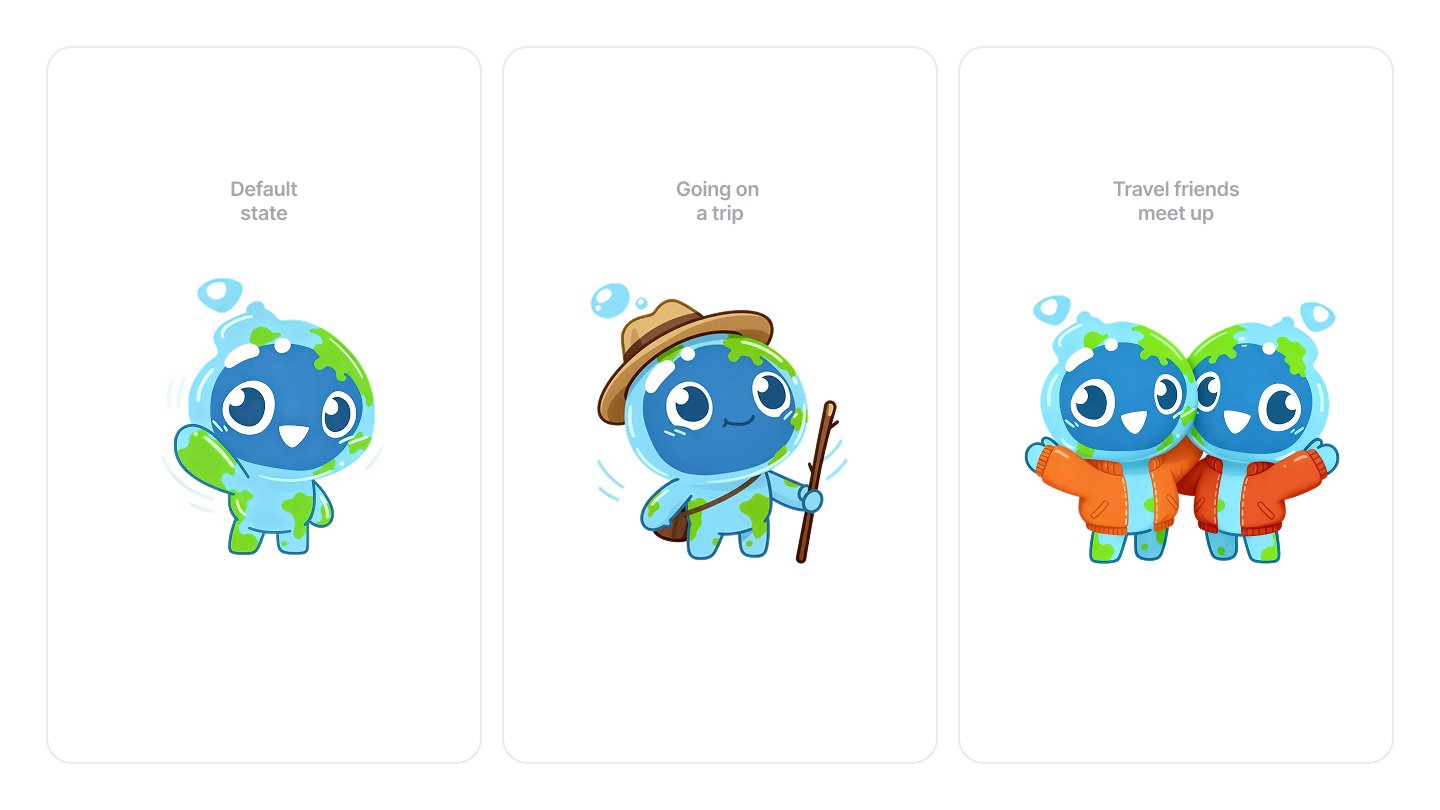
tripbff is a travel companion app. We designed the full character across its core states — default idle, a prop-based trip variant with hat and walking stick, and a two-character scene for the friend meet-up moment. All three share the same underlying design so they feel like one coherent character at every point in the app.
This is where Joy becomes a living character. We build the underlying system that lets her move, look in any direction, and show any emotion at any moment. Think of this as the engine — invisible to users, but everything that follows depends on it being built well.
Joy learns to look left, right, up, and down. Any emotion can be applied at any head position. Any prop can be added to any animation.
- Base character system — Joy can move but animations are not yet added
- All three sizes working and tested
tripbff build progression. Every character starts the same way — color palette defined, structural wireframe built, texture pass applied, final render polished. This is the same process we follow for Joy, ensuring the character holds up at every size and in every context before a single animation frame is produced.
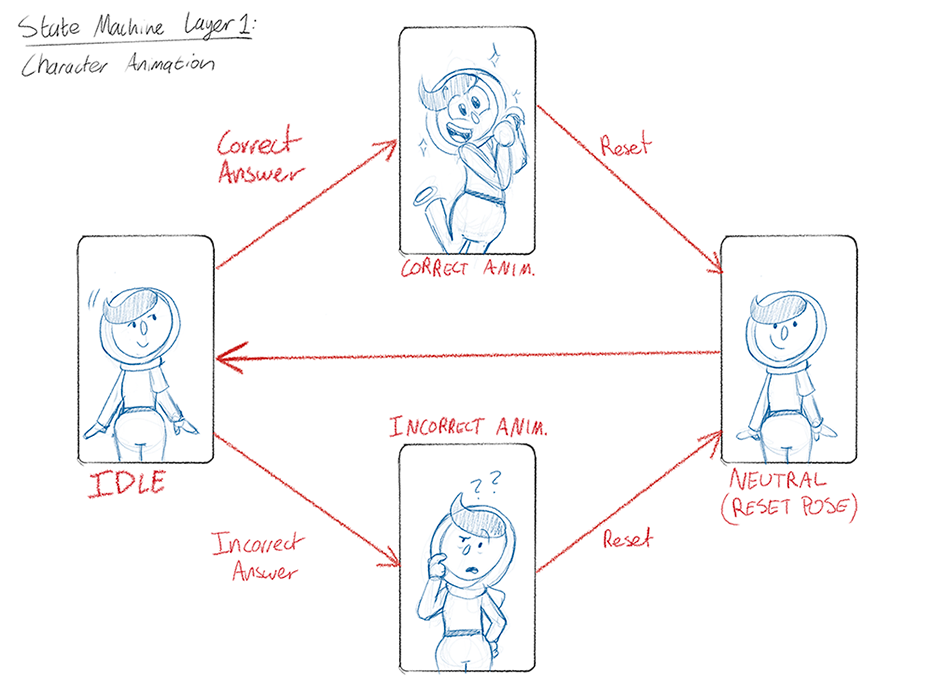
State machine planning for a previous character project. Before building in Rive, we map out every state and how the character moves between them. Idle flows to a correct or incorrect animation, each resets to a neutral pose, and the cycle repeats. Joy's system follows the same logic — named states your developers trigger directly from code, no guesswork.
In-app animation samples for the tripbff mascot, built in Rive and triggered directly by the state machine. Each animation responds to a specific user action — the same approach used for every animation in Joy's system.
Joy learns to feel things. We animate all 14 expressions and build three background mood loops that play as ambient states. Because emotions sit on a separate layer, any expression works at any head position in any animation — no extra production required.
| Expression | When Joy uses it |
|---|---|
| Neutral | Resting, waiting, default state |
| Happy | Menu created, recipe saved, chef booked |
| Sad | No chefs available, something could not be done |
| Frustrated | Errors, things going wrong |
| Surprised | First great chef match, something unexpected |
| Thinking | AI generating a menu, processing a link |
| Focused | Cooking mode, reading a recipe step |
| Encouraging | Step completed, progress made |
| Curious | Browsing, exploring chefs or recipes |
| Excited | About to hit a milestone, great match found |
| Sleepy | Widget, lock screen, long inactivity |
| Loving | A regular chef shown, a household favourite recipe |
| Proud | Streak completed, something hard finished |
| Cheeky | Fun social moments, personality beats |
| Mood loop | Feels like | Used when |
|---|---|---|
| Happy | Gentle float, warm glow | Default throughout the app |
| Sad | Slow, slightly heavy | When something cannot be done |
| Frustrated | Still, a quiet tension | Errors — always resolves to Happy once fixed |
- All 14 expressions working in the character system
- 3 mood loops playing cleanly on seamless repeat
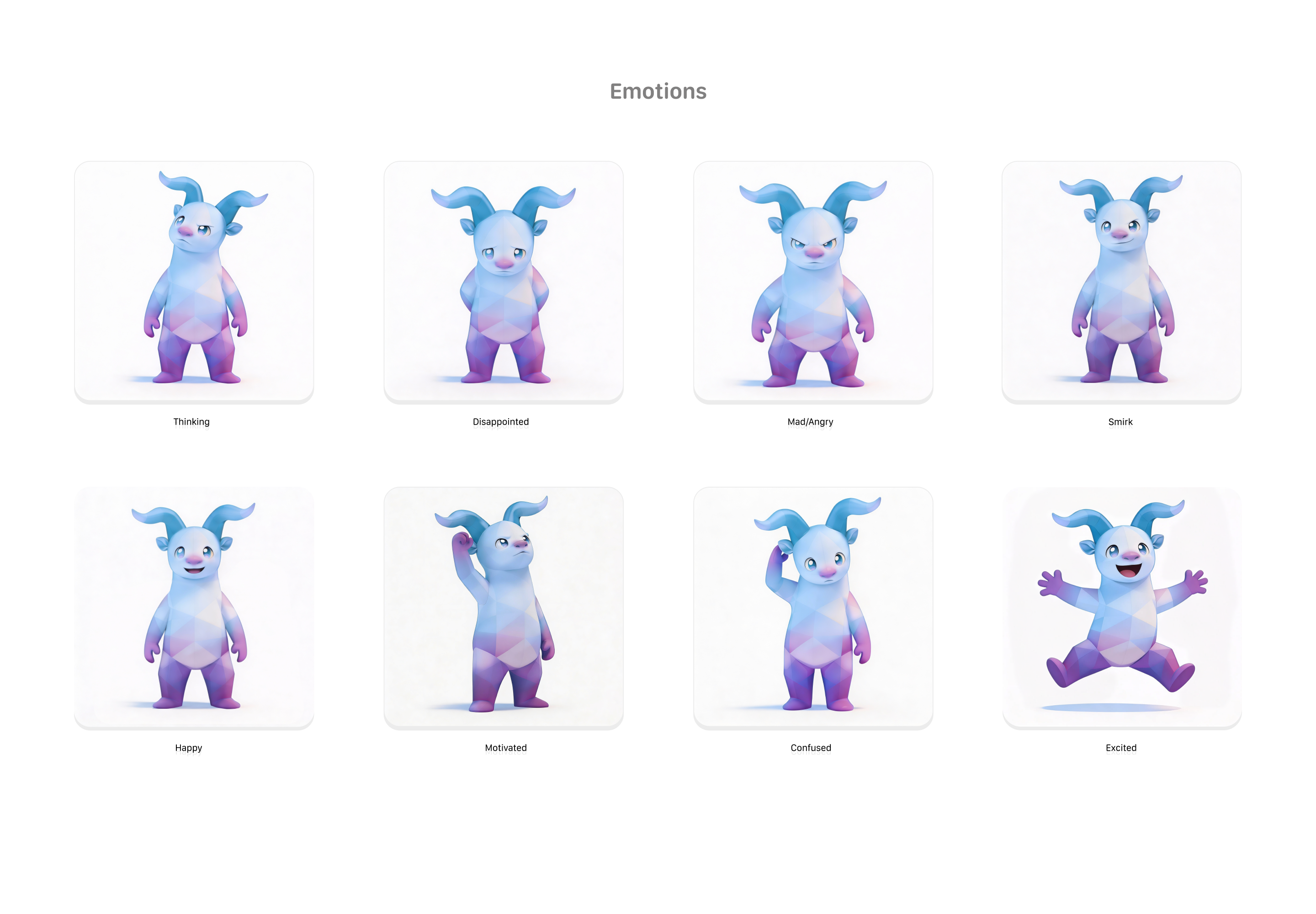
Tradezella is a trading performance and analytics platform. We built a complete expression system for their mascot covering 8 emotional states — Thinking, Disappointed, Mad/Angry, Smirk, Happy, Motivated, Confused, and Excited. The brief was to capture the full emotional arc of a trader: focused analysis, the frustration of a loss, the energy of a winning position. Every expression sits on the same character rig and swaps cleanly into any animation, exactly as Joy's system is designed to work.
Joy now covers every key moment a user encounters across the app. Each animation is mapped to a specific trigger — what the user does, and what Joy does in response. The menu generation moment is the most important: right now when a user taps Generate Menu, there is nothing on screen while the AI works. Joy fills that wait and makes the experience feel alive.
| Menus | What triggers it |
|---|---|
| Welcome to Menus | First time a user visits with no menus yet |
| Generating a menu | User taps Generate Menu — Joy thinks until the result arrives |
| Menu revealed | Menu appears — Joy celebrates |
| Editing mode | User taps Edit Menu |
| Recipes | What triggers it |
|---|---|
| Empty cookbook | First visit with no saved recipes — Joy holds an open book |
| Adding a recipe by link | User pastes a URL — Joy leans in, curious |
| Recipe saved | Successful import — quick celebration |
| Cooking mode | User enters the step-by-step view — Joy focuses |
| Watching the timer | Timer is running — Joy glances at the countdown |
| Step completed | User advances a step — Joy encourages them |
| Recipe finished | All steps done — Joy presents the finished dish |
| Kitchen, Chefs and global | What triggers it |
|---|---|
| Empty kitchen | User visits Kitchen with no ingredients added |
| Chef booked | Booking confirmed — big celebration |
| Something went wrong | Error of any kind — Joy is gentle about it |
| First launch welcome | Very first time the app is opened |
- All in-app animations working in the character system
- Preview video of every animation (MP4, one per animation)
The otter mascot running inside a live onboarding flow. This is what the end result looks like to a real user — the character sitting naturally within product screens, animated and responsive, not a mockup. Joy will be built and integrated to the same standard.
The five milestone moments users will remember — and six props that make Joy feel like she genuinely belongs in a cooking app. Achievement animations are longer and more expressive than standard in-app moments. They are designed to feel special and shareable.
| Milestone | What Joy does |
|---|---|
| First menu planned | Theatrically opens and presents a recipe book to camera |
| First recipe saved | Does a chef’s kiss, spatula in hand |
| First chef booked | Three claps, then both arms raised in victory |
| Cooked 5 nights in a row | Raises a frying pan overhead like a trophy, sparks fly |
| Grocery list all done | Swings a full grocery bag, a checkmark appears |
| Cooking prop | Where it appears |
|---|---|
| Frying pan | Cooking streak milestone |
| Wooden spatula | Step complete, first recipe milestone |
| Open recipe book | Empty cookbook, first menu milestone |
| Grocery bag | Grocery list milestone |
| Bowl of food with steam | Recipe complete animation |
| Tomato | Marketing and social content |
- All milestone animations built and working
- All 6 props designed and attached to the character
- Preview video of each milestone (MP4)
Animation work from another character project showing range in motion style, expression, and energy — from high-energy celebration moments to calm ambient states. Joy's achievement animations are built with the same attention to pacing and character personality.
Everything is tested, polished, and packaged so your development team can drop Joy into the app without friction. We check that every animation loops cleanly, every emotion works at every size, and every prop sits correctly in every animation that uses it.
Your team receives a plain-language guide that tells them exactly how to trigger every animation and emotion from code — with clear examples, no technical experience needed to follow it.
- Final Joy file — full size, complete and ready for your app
- Final Joy files — small and tiny sizes for chat and the nav button
- MP4 export of every single animation — for review, presentations, and social
- Developer guide — plain-language trigger instructions for your dev team
Two tiers, one foundation
The character, the expressions, the props, and the emotion system are identical in both tiers. Core launches with a smaller animation library that can be expanded at any point. Full covers the entire app from day one.
- Character design + animation systemIncluded
- 14 expressionsAll 14
- 3 mood loopsAll 3
- In-app animations15
- Milestone celebrations5
- Cooking props6
- All app sizesIncluded
- MP4 preview packIncluded
- Developer guideIncluded
- Character design + animation systemIncluded
- 14 expressionsAll 14
- 3 mood loopsAll 3
- In-app animations8 of 15
- Milestone celebrations3 of 5
- Cooking props6
- All app sizesIncluded
- MP4 preview packIncluded
- Developer guideIncluded